
Viewing PDFs from Ries Graphics
Proper Settings to View Electronic Proofs Sent Via Email
When checking proofs, for quality there is no substitute for looking at a "hard" proof. For quicker turnaround times, e-mailing PDF files can be the quickest way to check and approve last-minute changes and corrections before outputting plates, allowing tight schedules to be maintained.
Ries Graphics PDF proofs are generated by our Pre-Press Department and optimized for sending via e-mail. Normally, these low resolution PDF e-mail proofs are used for checking content only. While they are a complete and accurate low resolution preview of the print job, it is important to note that these proofs are not 100% color accurate due to the variety of monitor configurations, and the colors viewed on screen are simulations of what will actually be printed.
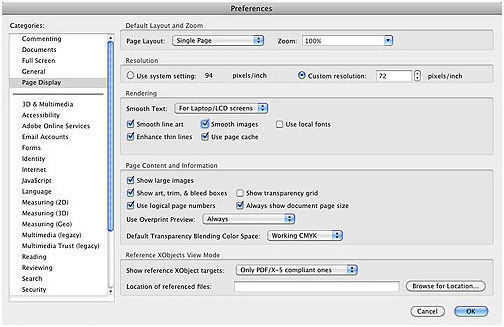
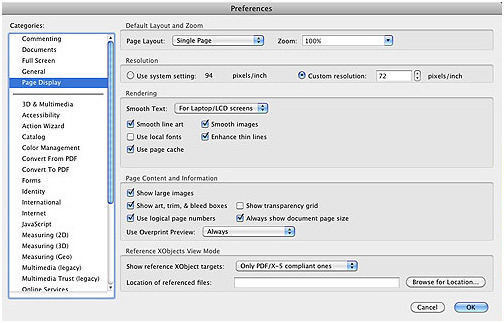
Our Pre-Press Department has found the settings shown below to be helpful when viewing PDF files, especially for checking potential overprint issues on press. The settings and screen captures were from Adobe Reader 11 and Adobe Acrobat X; there are similar settings in older versions of those programs.

Why Use These Settings For Your Print Proofs?
A logo created in Adobe Illustrator as black with Overprint Fill and/or Overprint Stroke turned on, then changed to white, will retain the overprint settings, causing the logo to disappear when trapped, plated and printed. In this example, without Overprint Preview turned on, the logo would appear fine. With Overprint Preview turned off, however, the logo would not show up on the PDF, enabling corrective action to be taken before the job is plated or printed. Of course, other overprinting areas can also be viewed, and anything less than pleasing can then be flagged or fixed. (These settings are also helpful when pre-flighting PDF files before sending them to Ries.)
If you are using the full version of Acrobat, we also recommend using the Output Preview panel when checking files — unchecking and rechecking the Simulate Overprint box can help reveal potential problems.
Adobe Reader 11
(NOTE: Adobe Reader is available as a free download.)
Open the Preferences window. Under Categories, click Page Display. In the Page Content and Information section, use the pull-down menu to change Use Overprint Preview to Always. We also recommend that in the Rendering section, Use local fonts should be unchecked.
Acrobat X
Open the Preferences window. Under Categories, click Page Display. In the Page Content and Information section, use the pull-down menu to change Use Overprint Preview to Always. In the Rendering section, Use local fonts should be unchecked.